Laravel Activity Log UI
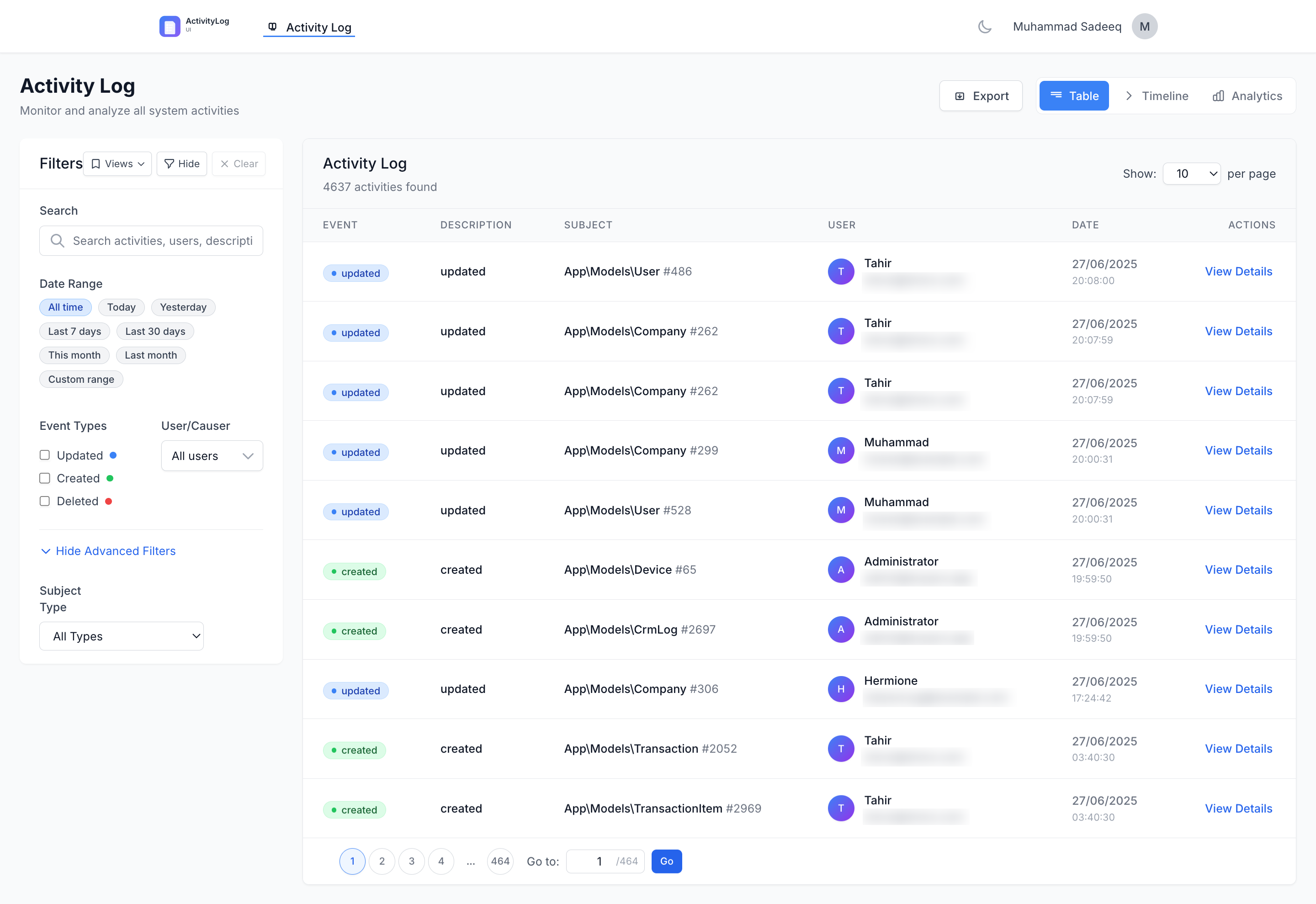
Table of Contents
- Introduction
- Features Overview
- Requirements & Dependencies
- Installation & Setup
- Configuration Guide
- Authorization & Access Control
- User Interface Components
- Analytics Dashboard
- Export System
- API Endpoints
- Services Architecture
- Customization
- Performance Optimization
- Troubleshooting
- Advanced Usage
Introduction
Laravel Activity Log UI is a comprehensive, modern interface for Spatie's Laravel Activity Log package. It provides a beautiful, feature-rich dashboard for viewing, analyzing, and managing activity logs in your Laravel application.
Important: This package assumes you already have Spatie's Activity Log installed and configured. It does not replace the logging functionality—only provides a powerful UI for viewing the logged activities.
Features Overview
Core Features
- Multiple View Types: Table view, Timeline view, and Analytics dashboard
- Advanced Filtering: Date presets, event types, users, models, search functionality
- Export System: CSV, Excel (XLSX), PDF, and JSON exports with queue support
- Analytics Dashboard: Statistics, charts, trends, and user insights
- Saved Views: Save and manage filter combinations for quick access
- Real-time Search: Intelligent search with suggestions and autocomplete
- Authorization: Flexible access control with gates, middleware, and role-based access
- Performance Optimized: Caching, eager loading, and pagination for large datasets
Technical Features
- No Build Step Required: Uses Tailwind CDN and Alpine.js
- Dark Mode Support: Built-in dark/light theme toggle
- Mobile Responsive: Optimized for all screen sizes
- Queue Integration: Background processing for large exports
- Email Notifications: Automated notifications for completed exports
- Caching: Intelligent caching for performance optimization
Requirements & Dependencies
Core Requirements
- PHP ≥ 8.1
- Laravel 10, 11, or 12
- spatie/laravel-activitylog ≥ 4.8
- Database table
activity_logwith Spatie's default schema
Optional Dependencies
| Feature | Package | Version | Fallback |
|---|---|---|---|
| Excel Export (XLSX) | maatwebsite/excel | ^3.1 | CSV format |
| PDF Export | barryvdh/laravel-dompdf | ^2.0 | JSON format |
Install optional dependencies:
composer require maatwebsite/excel barryvdh/laravel-dompdf
Installation & Setup
1. Install the Package
composer require muhammadsadeeq/laravel-activitylog-ui
2. Publish Resources (Optional)
# Publish configuration file
php artisan vendor:publish --provider="MuhammadSadeeq\ActivitylogUi\ActivitylogUiServiceProvider" --tag="activitylog-ui-config"

# Publish views for customization
php artisan vendor:publish --provider="MuhammadSadeeq\ActivitylogUi\ActivitylogUiServiceProvider" --tag="activitylog-ui-views"

# Publish assets (logos, icons)
php artisan vendor:publish --provider="MuhammadSadeeq\ActivitylogUi\ActivitylogUiServiceProvider" --tag="activitylog-ui-assets"
3. Ensure Spatie Activity Log is Set Up
Make sure you have already set up Spatie's package:
php artisan vendor:publish --provider="Spatie\Activitylog\ActivitylogServiceProvider" --tag="activitylog-migrations"
php artisan migrate
4. Access the UI
Visit /activitylog-ui in your browser (default route).
Configuration Guide
The package configuration is located at config/activitylog-ui.php. Below are the main configuration sections:
Route Configuration
'route' => [
    'prefix' => 'activitylog-ui',        // URL prefix
    'name' => 'activitylog-ui.',         // Route name prefix
    'middleware' => null,                // Auto-determined or custom array
    'domain' => null,                    // Custom domain binding
],
Authorization Configuration
'authorization' => [
    'enabled' => false,                  // Enable/disable authentication
    'gate' => 'viewActivityLogUi',       // Gate name for authorization
    'policy' => null,                    // Custom policy class
    'guard' => null,                     // Custom guard
],
Access Control Configuration
'access' => [
    'allowed_users' => [                 // Email whitelist
        // 'admin@example.com',
    ],
    'allowed_roles' => [                 // Role whitelist (requires role package)
        // 'admin', 'manager',
    ],
],
UI Configuration
'ui' => [
    'title' => 'Activity Log',           // Page title
    'brand' => 'ActivityLog UI',         // Brand name
    'logo' => null,                      // Custom logo path
    'default_view' => 'table',           // table|timeline
    'per_page_options' => [10, 25, 50, 100],
    'default_per_page' => 25,
],
Features Configuration
'features' => [
    'analytics' => true,                 // Enable analytics dashboard
    'exports' => true,                   // Enable export functionality
    'saved_views' => true,               // Enable saved views
],
Export Configuration
'exports' => [
    'enabled_formats' => ['csv', 'xlsx', 'pdf', 'json'],
    'max_records' => 10000,              // Maximum records per export
    'queue' => [
        'enabled' => false,              // Enable background processing
        'threshold' => 1000,             // Queue exports above this number
        'queue_name' => 'exports',       // Queue name
        'timeout' => 300,                // Job timeout in seconds
        'tries' => 3,                    // Number of retry attempts
    ],
    'notifications' => [
        'enabled' => true,               // Send completion notifications
        'channels' => ['mail'],          // Notification channels
        'mail' => [
            'from_address' => null,      // Custom from address
            'from_name' => 'Activity Log Exports',
            'subject' => 'Your Activity Log Export is Ready',
        ],
    ],
],
Analytics Configuration
'analytics' => [
    'cache_duration' => 3600,            // Cache duration in seconds
    'chart_colors' => [                  // Event type colors
        'created' => '#10b981',
        'updated' => '#3b82f6',
        'deleted' => '#ef4444',
        'custom' => '#8b5cf6',
    ],
],
Performance Configuration
'performance' => [
    'cache_prefix' => 'activitylog_ui',  // Cache key prefix
    'eager_load_relations' => ['causer', 'subject'], // Relations to eager load
],
Authorization & Access Control
The package provides flexible authorization mechanisms:
1. Public Access (Default)
'authorization' => ['enabled' => false],
'access' => ['allowed_users' => [], 'allowed_roles' => []],
Anyone can access the UI without authentication.
2. Authenticated Users Only
'authorization' => ['enabled' => true],
'access' => ['allowed_users' => [], 'allowed_roles' => []],
Requires login but allows all authenticated users.
3. Specific Users Only
'authorization' => ['enabled' => false], // or true
'access' => [
    'allowed_users' => ['admin@example.com', 'manager@example.com'],
    'allowed_roles' => [],
],
4. Role-Based Access
'access' => [
    'allowed_users' => [],
    'allowed_roles' => ['admin', 'manager', 'developer'],
],
Requires a role package like Spatie Permission.
5. Custom Gate Logic
Define custom authorization logic in your AuthServiceProvider:
Gate::define('viewActivityLogUi', function ($user) {
    return $user->hasPermission('view-activity-logs')
           && $user->department === 'IT';
});
Middleware Chain
When authorization is enabled, the middleware chain becomes:
['web', 'auth', ActivityLogAccessMiddleware::class]
User Interface Components
Dashboard Layout
The main dashboard provides three distinct views:
1. Table View
- Features: Sortable columns, pagination, bulk selection
- Columns: ID, Description, Event, User, Model, Properties, Date
- Actions: View details, filter by related activities
- Performance: Optimized pagination with intelligent caching
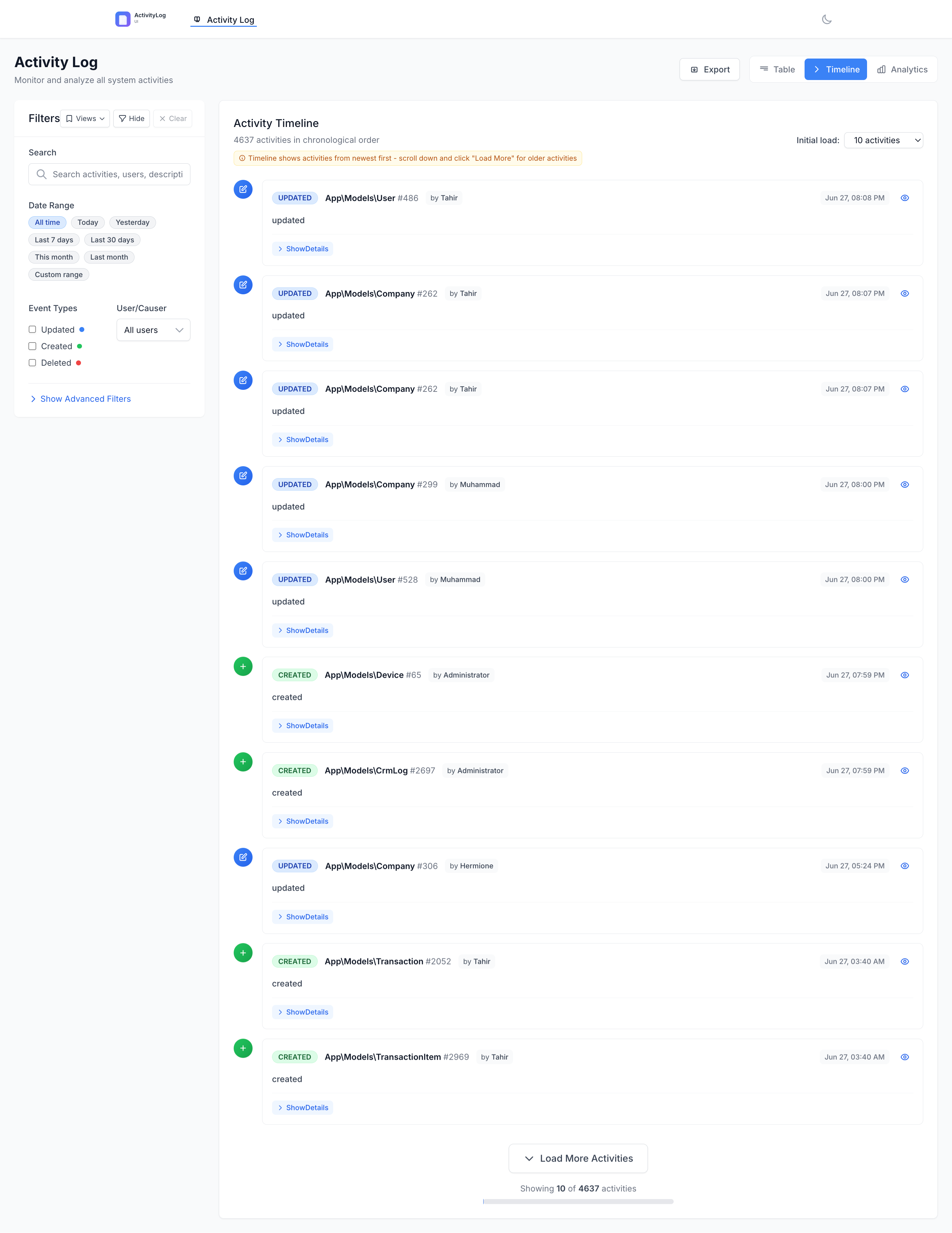
2. Timeline View
- Features: Chronological activity display, grouped by date
- Visual: Timeline with event icons and color coding
- Details: Expandable activity cards with full information
- Navigation: Date-based navigation and filtering
3. Analytics Dashboard
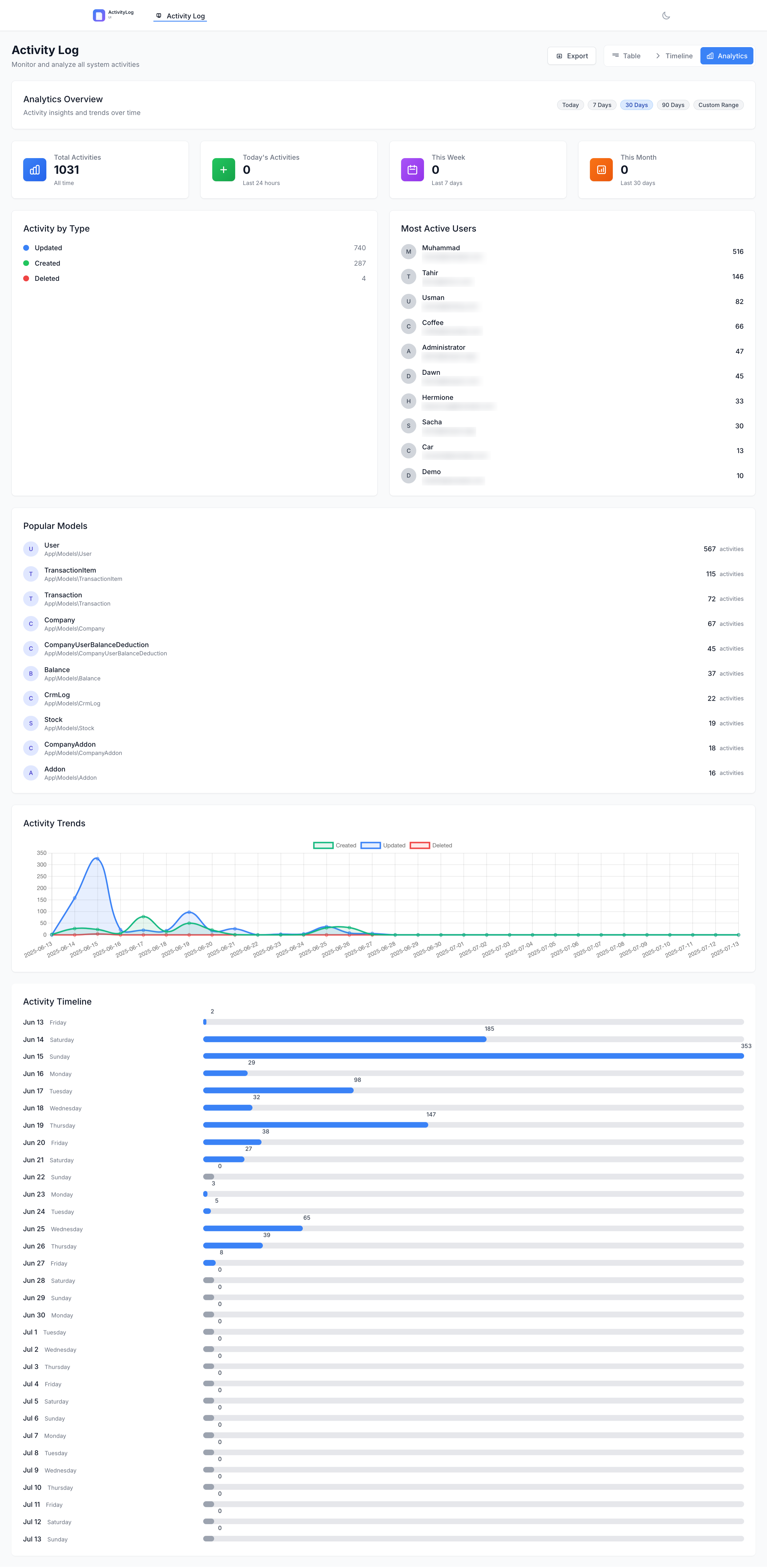
- Features: Statistical overview, charts, trends
- Metrics: Total activities, daily/weekly/monthly counts, active users
- Charts: Event type breakdown, user activity, timeline trends
- Filters: Date range selection, custom period support
Filter Panel
The unified filter panel provides:
Date Filtering
- Presets: All time, Today, Yesterday, Last 7/30 days, This/Last month
- Custom Range: Date picker for specific periods
- Persistence: Remembers last used filters
Content Filtering
- Search: Full-text search across descriptions and properties
- Event Types: Multi-select event type filtering
- Users: User selection with autocomplete
- Models: Filter by subject model type
- Advanced: Property key filtering
Saved Views
- Save Filters: Store frequently used filter combinations
- Quick Access: One-click filter application
- Management: Edit, delete, and organize saved views
- Sharing: Export/import filter configurations
Activity Detail Modal
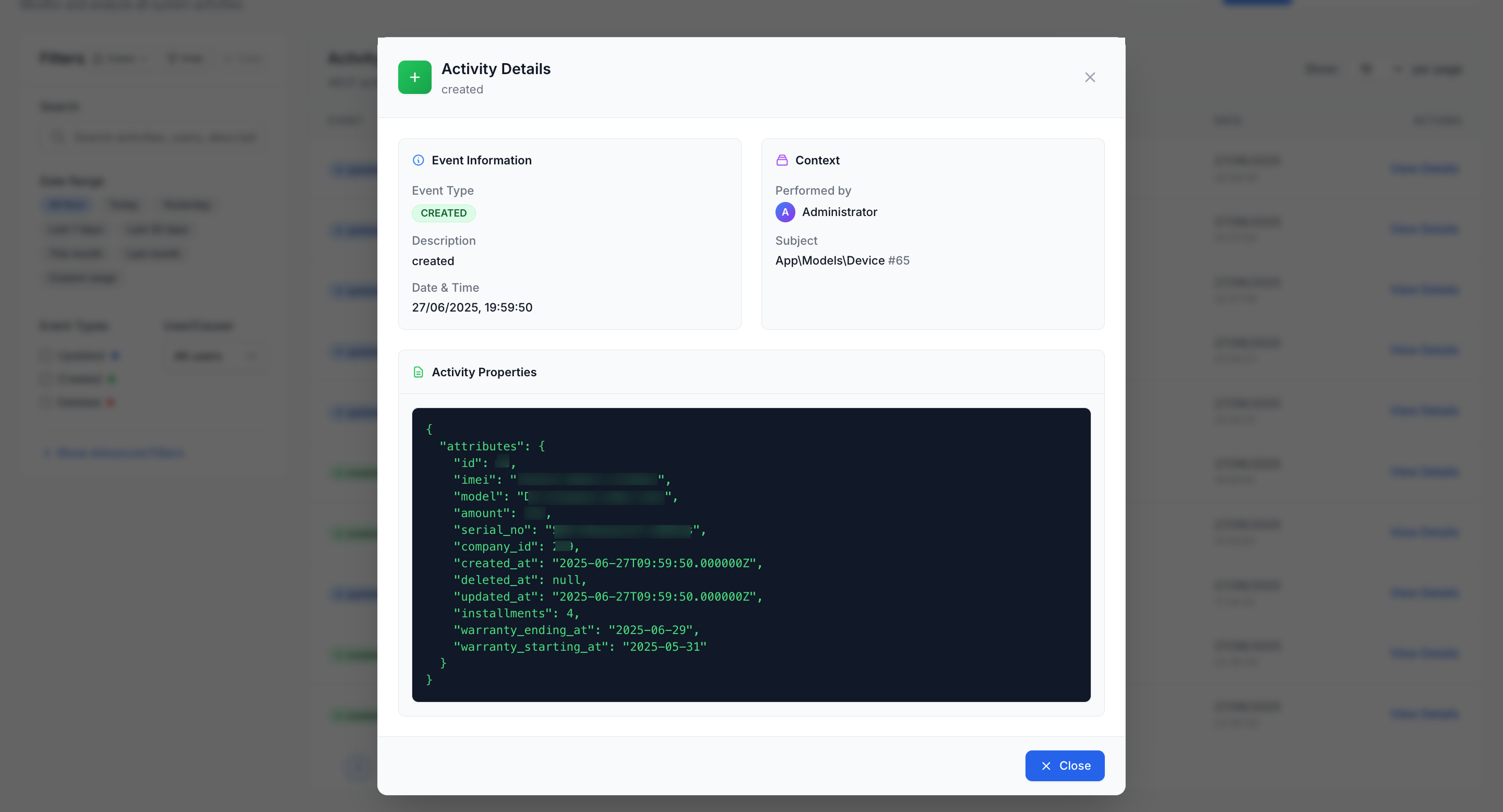
Detailed view for individual activities:
- Basic Information: Event, description, timestamp
- User Information: Causer details with avatar
- Model Information: Subject model with relationships
- Property Changes: Before/after comparison for updates
- Related Activities: Other activities on the same model
- JSON View: Raw activity data for debugging
Analytics Dashboard
Overview Statistics
Four key metric cards display:
- Total Activities: All-time activity count
- Today's Activities: Last 24 hours
- This Week: Last 7 days
- This Month: Last 30 days
Event Type Breakdown
- Visual Chart: Percentage-based breakdown of activity types
- Color Coding: Consistent colors per event type
- Interactive: Click to filter activities
- Customizable: Configurable colors in config file
Top Users Analysis
- Most Active Users: Users with highest activity counts
- Activity Metrics: Activities per user in selected period
- User Profiles: Click to view user-specific analytics
- Time-based: Adapts to selected time period
Activity Timeline
- Trend Visualization: Daily activity counts over time
- Interactive Chart: Hover for detailed information
- Period Selection: Today, 7 days, 30 days, 90 days, custom range
- Performance: Cached results for fast loading
Advanced Analytics Features
- Activity Heatmap: GitHub-style activity calendar
- Anomaly Detection: Identifies unusual activity patterns
- Model Popularity: Most frequently modified models
- User Activity Profiles: Detailed per-user analytics
Export System
Supported Formats
1. CSV Export
- Always Available: No additional dependencies
- Format: Standard comma-separated values
- Features: UTF-8 encoding, proper escaping
- Use Case: Excel compatibility, data analysis
2. Excel (XLSX) Export
- Dependency:
maatwebsite/excel - Fallback: CSV if package not installed
- Features: Multiple sheets, formatting, formulas
- Use Case: Advanced spreadsheet analysis
3. PDF Export
- Dependency:
barryvdh/laravel-dompdf - Fallback: JSON if package not installed
- Features: Custom templates, pagination, headers/footers
- Use Case: Reports, presentations, archival
4. JSON Export
- Always Available: No additional dependencies
- Format: Structured JSON with metadata
- Features: Full activity data, relationships
- Use Case: API integration, data migration
Export Features
Queue Processing
Large exports can be processed in the background:
'exports' => [
    'queue' => [
        'enabled' => true,
        'threshold' => 1000,         // Queue exports > 1000 records
        'queue_name' => 'exports',
        'timeout' => 300,
        'tries' => 3,
    ],
],
Email Notifications
Users receive notifications when queued exports complete:
'exports' => [
    'notifications' => [
        'enabled' => true,
        'channels' => ['mail'],
        'mail' => [
            'subject' => 'Your Activity Log Export is Ready',
        ],
    ],
],
Export Validation
Before processing, exports are validated for:
- Record Count: Prevents oversized exports
- Format Support: Checks for required packages
- Permissions: Ensures user can access filtered data
- Resource Limits: Memory and time constraints
Export Workflow
- Filter Selection: User applies desired filters
- Format Selection: Choose export format
- Validation: System checks limits and dependencies
- Processing: Direct download or queue job
- Notification: Email sent when complete (if queued)
- Download: Secure download link with expiration
API Endpoints
The package exposes several API endpoints for programmatic access:
Activity Endpoints
GET /activitylog-ui/api/activities
GET /activitylog-ui/api/activities/{id}
GET /activitylog-ui/api/activities/{id}/related
GET /activitylog-ui/api/recent
Search & Filter Endpoints
GET /activitylog-ui/api/search/suggestions
GET /activitylog-ui/api/filter-options
GET /activitylog-ui/api/event-types-styling
Analytics Endpoints
GET /activitylog-ui/api/analytics
GET /activitylog-ui/api/analytics/heatmap
GET /activitylog-ui/api/users/{userId}/profile
Export Endpoints
POST /activitylog-ui/api/export
GET /activitylog-ui/api/export/formats
GET /activitylog-ui/api/export/progress
GET /activitylog-ui/export/download
Saved Views Endpoints
GET /activitylog-ui/api/views
POST /activitylog-ui/api/views
DELETE /activitylog-ui/api/views
Services Architecture
ActivitylogService
Core service for activity management:
- Activity Retrieval: Filtered and paginated queries
- Search Functionality: Full-text search with suggestions
- Filter Application: Complex filtering logic
- Saved Views: View management and storage
- Related Activities: Find related activities for models
AnalyticsService
Provides analytics and reporting:
- Dashboard Statistics: Key metrics calculation
- Trend Analysis: Activity trends over time
- User Analytics: User-specific activity profiles
- Chart Data: Formatted data for visualization
- Caching: Performance optimization through caching
ExportService
Handles all export functionality:
- Format Handling: Multi-format export support
- Queue Management: Background job processing
- File Generation: Creates export files
- Download Management: Secure file serving
- Cleanup: Automatic cleanup of old exports
Customization
View Customization
Publish and modify views:
php artisan vendor:publish --provider="MuhammadSadeeq\ActivitylogUi\ActivitylogUiServiceProvider" --tag="activitylog-ui-views"
Views are located in resources/views/vendor/activitylog-ui/:
layouts/app.blade.php- Main layoutpages/dashboard.blade.php- Dashboard pagecomponents/- UI componentsexports/pdf.blade.php- PDF export template
Asset Customization
Publish assets for customization:
php artisan vendor:publish --provider="MuhammadSadeeq\ActivitylogUi\ActivitylogUiServiceProvider" --tag="activitylog-ui-assets"
Extending the Activity Model
Create a custom Activity model:
namespace App\Models;

use MuhammadSadeeq\ActivitylogUi\Models\Activity as BaseActivity;

class Activity extends BaseActivity
{
    public function getFormattedDescriptionAttribute()
    {
        // Custom description formatting
        return ucfirst($this->description);
    }

    public function customProperty()
    {
        // Add custom properties or methods
        return $this->properties['custom_field'] ?? null;
    }
}
Update the activity log configuration:
// In config/activitylog.php
'activity_model' => App\Models\Activity::class,
Custom Export Templates
Create custom PDF export templates:
// Create resources/views/custom-exports/activity-report.blade.php
@extends('activitylog-ui::layouts.app')

@section('content')
<div class="custom-report">
    <!-- Your custom template -->
</div>
@endsection
Performance Optimization
Caching Strategy
The package implements intelligent caching:
- Analytics Data: Cached for 1 hour (configurable)
- Filter Options: Cached for 30 minutes
- User Searches: Recent searches cached for quick access
- Export Progress: Job status cached for 24 hours
Database Optimization
Indexes
Ensure proper indexing on the activity_log table:
-- Essential indexes for performance
CREATE INDEX idx_activity_log_created_at ON activity_log(created_at);
CREATE INDEX idx_activity_log_causer ON activity_log(causer_type, causer_id);
CREATE INDEX idx_activity_log_subject ON activity_log(subject_type, subject_id);
CREATE INDEX idx_activity_log_event ON activity_log(event);
CREATE INDEX idx_activity_log_log_name ON activity_log(log_name);

-- Composite indexes for common filter combinations
CREATE INDEX idx_activity_log_causer_created ON activity_log(causer_type, causer_id, created_at);
CREATE INDEX idx_activity_log_event_created ON activity_log(event, created_at);
Eager Loading
The package automatically eager loads relations:
'performance' => [
    'eager_load_relations' => ['causer', 'subject'],
],
Memory Management
- Chunked Processing: Large datasets processed in chunks
- Pagination: Efficient pagination for UI
- Export Limits: Configurable limits prevent memory issues
- Queue Processing: Large operations moved to background
Frontend Performance
- CDN Assets: Tailwind CSS and Alpine.js from CDN
- Lazy Loading: Components loaded as needed
- Caching: Browser caching for static assets
- Minimal JavaScript: Lightweight Alpine.js implementation
Troubleshooting
Common Issues
1. Permission Denied
Problem: 403 errors when accessing the UI
Solutions:
- Check
authorization.enabledsetting - Verify user email in
access.allowed_users - Ensure user has required roles in
access.allowed_roles - Check custom gate logic in
AuthServiceProvider
2. No Activities Showing
Problem: Dashboard shows no activities
Solutions:
- Verify Spatie Activity Log is logging activities
- Check database table
activity_loghas data - Review applied filters (clear all filters)
- Check date range filters
3. Export Failures
Problem: Exports fail or timeout
Solutions:
- Check required packages installed (
maatwebsite/excel,barryvdh/laravel-dompdf) - Reduce export record limit in config
- Enable queue processing for large exports
- Check disk space and permissions
4. Performance Issues
Problem: Slow loading times
Solutions:
- Add database indexes (see Performance Optimization)
- Enable caching in config
- Reduce
per_pagelimits - Enable eager loading
5. Queue Jobs Failing
Problem: Background export jobs fail
Solutions:
- Check queue worker is running
- Verify queue configuration
- Check job timeout settings
- Review Laravel logs for errors
Debug Mode
Enable debug logging in your .env:
APP_DEBUG=true
LOG_LEVEL=debug
Check logs for package-related errors:
tail -f storage/logs/laravel.log | grep -i activitylog
Database Troubleshooting
Check the activity log table structure:
DESCRIBE activity_log;
SELECT COUNT(*) FROM activity_log;
SELECT * FROM activity_log ORDER BY created_at DESC LIMIT 10;
Advanced Usage
Custom Authorization Logic
Implement complex authorization:
// In AuthServiceProvider
Gate::define('viewActivityLogUi', function ($user) {
    // Complex logic
    return $user->hasRole('admin')
           || ($user->hasRole('manager') && $user->department === 'IT')
           || $user->hasPermission('view-audit-logs');
});
Integration with Spatie Permission
Use with role-based permissions:
// In config/activitylog-ui.php
'access' => [
    'allowed_roles' => ['super-admin', 'admin', 'auditor'],
],

// In your User model
public function hasAnyRole($roles)
{
    return $this->hasRole($roles); // Spatie Permission method
}
Custom Export Formats
Add custom export formats:
// Create a custom export class
class CustomActivityExport implements FromCollection, WithHeadings
{
    public function collection()
    {
        // Custom export logic
    }

    public function headings(): array
    {
        // Custom headers
    }
}

// Extend ExportService
class CustomExportService extends ExportService
{
    public function exportToCustomFormat($activities, $options)
    {
        // Custom format implementation
    }
}
Event Listeners
Listen to activity log events:
// In EventServiceProvider
protected $listen = [
    'activity.logged' => [
        CustomActivityHandler::class,
    ],
];

// Custom handler
class CustomActivityHandler
{
    public function handle($event)
    {
        // Custom logic when activities are logged
    }
}
API Authentication
Secure API endpoints:
// Create custom routes with authentication
Route::middleware(['auth:api'])->group(function () {
    Route::get('/api/activities', [ActivityLogController::class, 'getActivities']);
});
Multi-tenant Support
Implement tenant-specific activity logs:
// Custom ActivitylogService
class TenantActivitylogService extends ActivitylogService
{
    public function applyFilters($query, $filters)
    {
        // Add tenant filtering
        $query->where('tenant_id', auth()->user()->tenant_id);

        return parent::applyFilters($query, $filters);
    }
}
This documentation provides comprehensive coverage of the Laravel Activity Log UI package, from basic setup to advanced customization. For additional support or questions, please refer to the package repository or create an issue.